

Phone
How to Stop Ink From Spreading on the Phone Screen
Sep
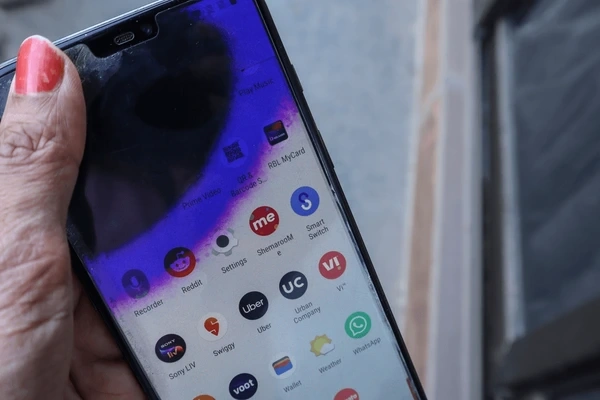
A tiny dark spot on your phone screen can quickly become a nightmare. Screen bleeding or ink spread occurs when internal display components get compromised by pressure or manufacturing flaws. Damaged liquid crystals migrate across LCD panels, creating ominous black patches.
But you can prevent ink from spreading on the phone screen by turning off the power immediately and eliminating all screen contact. Heat avoidance proves equally vital for stabilizing the damage. These critical initial responses, along with consistent protective measures, safeguard your display from complete failure. Proactive steps can help you preserve clear visuals and touch responsiveness over the long term.
What “Ink Spread” on a Phone Screen Actually Means (and Why It Happens)
Ink spread means dark patches that grow across your smartphone display like spilled liquid. This screen bleeding occurs when internal display layers get damaged and leak or oxidize. You see ominous black spots expanding gradually across the panel.
Several factors trigger this frustrating phenomenon. Here’s what commonly causes it:
- Physical pressure from drops or from sitting on your phone can break the delicate seals that hold liquid crystals in LCD screens. These oily compounds then migrate freely, creating spreading dark areas.
- Manufacturing defects leave weak points in display panels that fail under normal use. Some devices develop bleeding within weeks of purchase due to poor quality control.
- Heat exposure makes liquid crystals more fluid, so they flow faster through cracks. Temperatures above 95°F accelerate this destructive process significantly.
- Water damage compromises internal barriers, allowing moisture to mix with display materials. Even IP-rated phones suffer when seals fail under prolonged exposure.
- Electrical stress keeps damaged pixels active, worsening the leakage over time. Continued usage after spotting the problem speeds up total screen failure dramatically.
Practical Tips to Stop Further Ink Spread
Taking swift action when you first notice screen bleeding prevents minor damage from escalating into a catastrophic issue. Every minute counts when dealing with spreading black spots on your display.
1: Turn Off the Phone (Immediately)
Shut down your phone immediately when you spot ink spreading. Electrical current races through damaged display layers, worsening the leakage fast. Hold the power button firmly. Select complete shutdown, not just sleep mode.
Leave it off for at least 4-6 hours. This break stops active pixel stress completely. Your screen bleeding won’t expand without power flowing through compromised areas. Resist checking it too soon. Patience here prevents a complete display failure.
2: Remove Pressure From the Screen
Keep all pressure off your phone screen immediately. Finger taps push liquid crystals further through damaged seals. Place your device face up only on flat surfaces. Skip pockets or bags where squeezing happens easily. Hold the edges carefully when moving it around. This prevents screen bleeding from racing across your display quickly. Your touch layers stay stable without added force.
3: Avoid Extreme Heat
Heat turns the liquid crystals in your LCD panel into a fluid. They flow faster through cracks, causing rapid ink spread. Keep phones between 32°F and 95°F always. Skip direct sunlight or hot cars completely. Screen bleeding accelerates above safe temperatures quickly. Store your device in shaded cool spots. Battery warmth adds internal stress, too. Cool environments protect delicate display layers effectively every day.
4: Avoid Charging While Using
Charging generates heat while your processor works hard during use. This stresses display layers directly above, causing ink spread acceleration. Let phones charge completely when idle. Skip gaming or streaming while on a charger. Battery warmth and app demands quickly raise internal temperatures. Unplug once charging is complete. Original chargers regulate heat better than cheap ones. Your screen stays safe without this double heat threat daily.
5: Reduce Phone Workload
Heavy apps force your processor to generate excess heat constantly. This warms display layers, causing liquid crystals to leak faster through cracks. Close background tasks regularly now. Limit gaming sessions to 30 minutes maximum. Lower screen brightness helps too. Screen bleeding slows when constant internal stress is not building up. Clear the cache weekly for smoother operation. Your phone runs cooler with lighter daily workloads effectively.
Protective Accessories That Help
Quality accessories serve as your first line of defense against physical damage that can cause ink spread. Physical protection prevents the impacts and pressure that trigger screen bleeding:
- Tempered glass protectors: These distribute impact force across the entire surface rather than concentrating it.
- Shock-absorbing cases: Reinforced corners and raised edges protect your display during drops.
- Screen guards: Multiple layers of protection shield the display from scratches and minor impacts that can weaken it.
- Quality over price: Cheap accessories often trap heat or fail under impact when you need them most.
- Proper fit matters: Ill-fitting protectors can create pressure points that increase the risk of LCD damage.
When to Get Professional Help
Call Smart phone repair experts when the ink spread on your screen grows rapidly each day. Multiple black patches appearing signal widespread display failure beyond home fixes. Touch unresponsiveness in affected areas indicates digitizer damage as well.
Don’t risk DIY repairs that harm delicate cables further. Authorized technicians quickly and safely replace panels with genuine parts. Seek help before the total screen blackout happens completely.
Conclusion
Dark spots on your phone screen don’t need to spread uncontrollably. You stop ink from spreading on the phone screen by acting fast with power shutdowns and pressure avoidance. Daily habits such as heat management and lighter workloads effectively protect display layers over the long term. Tempered glass protectors and high-quality cases provide essential protection against drops and squeezes.
However, rapidly growing patches signal the need for professional repair quickly. These steps combined preserve clear visuals and touch response reliably. Visit Cell N Tech for expert screen diagnostics, genuine replacement parts, and protective accessories today. Our technicians solve ink spread issues efficiently, so you get back to clear displays fast.
FAQs
How to stop screen bleeding from spreading?
Turn off your phone immediately to halt electrical damage. Avoid all screen pressure and heat sources completely. Tempered glass protectors help prevent further ink spread effectively.
What to do if a black spot is spreading on a phone screen?
Power down your device right away and keep it cool. Never touch the black spot area where liquid crystals leak fast. Place face-up on flat surfaces only.
How to fix a bleeding phone screen at home?
Home fixes, such as letting it sit or restarting, only stop the ink from spreading temporarily. Screen bleeding requires professional replacement, as damaged display layers can’t self-repair.