

Gaming Console
How to Know When to Replace Xbox Series X Thermal Paste
Oct
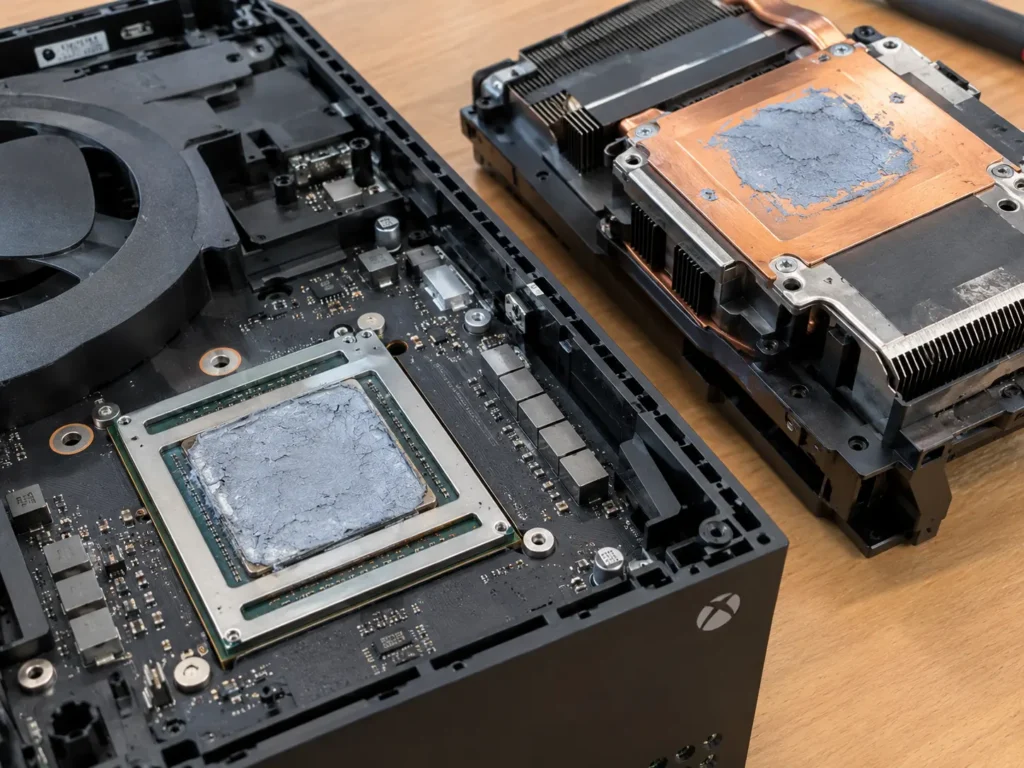
Your Series X used to run quietly through long gaming sessions. Now the fan roars within minutes, and the console has shut itself off more than once. Old, dried-out thermal paste could be the reason, especially on a console that’s several years old and still overheats after you’ve cleaned the vents and fixed its placement. The paste helps move heat away from the main chip, and it slowly loses its grip over time. Spotting those warning signs early tells you when to replace Xbox Series X thermal paste.
Key Takeaways
- Persistent overheating, repeated heat warnings, sudden shutdowns, and a fan that stays loud are the main signs your console’s cooling isn’t keeping up.
- Dust, blocked vents, poor placement, and fan problems cause similar symptoms. Rule those out before blaming the thermal paste.
- There’s no official replacement schedule. Most consoles don’t need new paste for several years, and only when cooling performance has clearly dropped.
- Opening a Series X takes care and may affect your warranty. A professional cooling service checks the paste, fan, and heatsink together.
Signs Your Xbox Series X May Need Thermal Paste Replacement
Thermal paste problems rarely show up overnight. The signs build slowly, and they tend to get worse during demanding games or long sessions.
Persistent Overheating During Gameplay
A healthy Series X can feel warm on top, especially near the vents. That’s normal. What isn’t normal is a console that gets hot quickly in every game, even less demanding ones, and stays that way after you’ve moved it to an open spot. If the top vent air feels noticeably hotter than it used to, or performance seems to dip in longer sessions, the chip may not be shedding heat as well as it should.
Repeated Thermal Warnings or Unexpected Shutdowns
The Series X is built to protect itself. When internal temperatures climb too high, it may display an overheating warning and shut down to prevent damage. One warning on a hot summer day in a cramped cabinet isn’t cause for panic. Warnings that keep coming back in a well-ventilated room are a much bigger concern. So are random shutdowns with no warning at all.
Fan Noise That Continues Despite Proper Ventilation
The Series X is known for running quietly, so a loud fan stands out. When cooling becomes less efficient, the fan spins faster to compensate. If it roars soon after you start playing, stays loud through menus and lighter games, and doesn’t calm down after cleaning and repositioning the console, heat isn’t moving away from the chip the way it should.
How to Tell if Thermal Paste Is the Problem
Overheating has several possible causes, and old thermal paste is only one of them. Work through the simpler ones first before anyone opens the console.
Rule Out Dust Buildup, Blocked Vents, and Fan Issues
Most Series X heat problems come from the outside rather than the inside. Run through this quick checklist:
- Placement: keep the console out of closed cabinets and away from walls, other electronics, and heat sources
- Airflow direction: make sure nothing sits on or directly above the top vent
- Dust: gently clear the vents with a soft brush or short bursts of compressed air while the console is off and unplugged
- Room temperature: hot rooms, direct sunlight, and summer heat all make the cooling system work harder
- Fan behavior: listen for grinding, rattling, or clicking, which point to a fan problem
If the console runs cooler after these fixes, the paste was never the issue.
Understand Why Symptoms Alone Cannot Confirm Thermal Paste Failure
Heat warnings, shutdowns, and fan noise only tell you the console is running hot. They can’t tell you why. A failing fan, a clogged heatsink, a power supply problem, or a software glitch can all look the same from the outside. The only way to confirm dried or uneven paste is to open the console and inspect the chip and heatsink directly. That’s a job where a trained technician’s eyes and tools make a real difference.
How Often Should You Replace Xbox Series X Thermal Paste?
Microsoft doesn’t publish a replacement schedule, and the Series X wasn’t designed for regular repasting. Factory paste is meant to last a long time, and plenty of consoles run fine for years without any attention inside.
A practical rule is to base the decision on performance, not the calendar. Many technicians start considering a repaste once a console is several years old and shows clear heat-related symptoms that cleaning and better placement didn’t fix. Consoles that run for long hours every day, sit in warm rooms, or live in dusty spaces may reach that point sooner. A console that still runs quietly and cool doesn’t need new paste just because of its age.
What Happens if You Delay Thermal Paste Replacement?
Putting it off usually means living with more noise, more interruptions, and more stress on the hardware. When heat can’t leave the chip efficiently, the console spends more time running hot, and that wears on components over the long run.
Here’s what often happens when a cooling problem goes unaddressed:
- Shutdowns become more frequent, sometimes in the middle of a game or download
- Unsaved progress gets lost when the console cuts out without warning
- The fan works harder for longer, which adds wear to the fan itself
- Sustained heat puts extra strain on the chip, memory, and power delivery parts
A cooling service is a fairly small job compared with replacing a damaged board or a whole console.
When to Get Professional Xbox Series X Cooling System Service
Once you’ve ruled out the simple fixes and the console still runs hot, it’s time to bring in a professional. The Series X is packed tightly inside, with a large heatsink, a vapor chamber, and delicate ribbon cables. Opening it without the right tools can crack clips, tear cables, or apply paste unevenly, which makes the heat problem worse. Opening the console yourself may also affect your Microsoft warranty, so check your coverage first if the console is still under warranty.
A proper cooling service covers more than just paste. A technician removes the old compound, cleans the chip and heatsink surfaces, applies fresh paste in the right amount, inspects the fan, and clears dust from internal airways. Then they test the console under load to confirm temperatures and noise are back to normal.
Conclusion
Old thermal paste becomes a likely suspect when your Series X keeps overheating, shows repeated heat warnings, or runs a loud fan even after you’ve cleared the vents and fixed its placement. Age alone isn’t a reason to repaste. Performance is. Because symptoms can’t confirm paste failure on their own, a hands-on inspection is the only sure way to know.
Tired of a console that sounds like a jet engine? Let CellNtech console technicians take it from here. We’ll open your Xbox Series X carefully, check the fan and heatsink, refresh the thermal paste if it needs it, and test everything before you head home to play.