

iPhone
How to Dry a Wet iPhone Without Rice
Oct
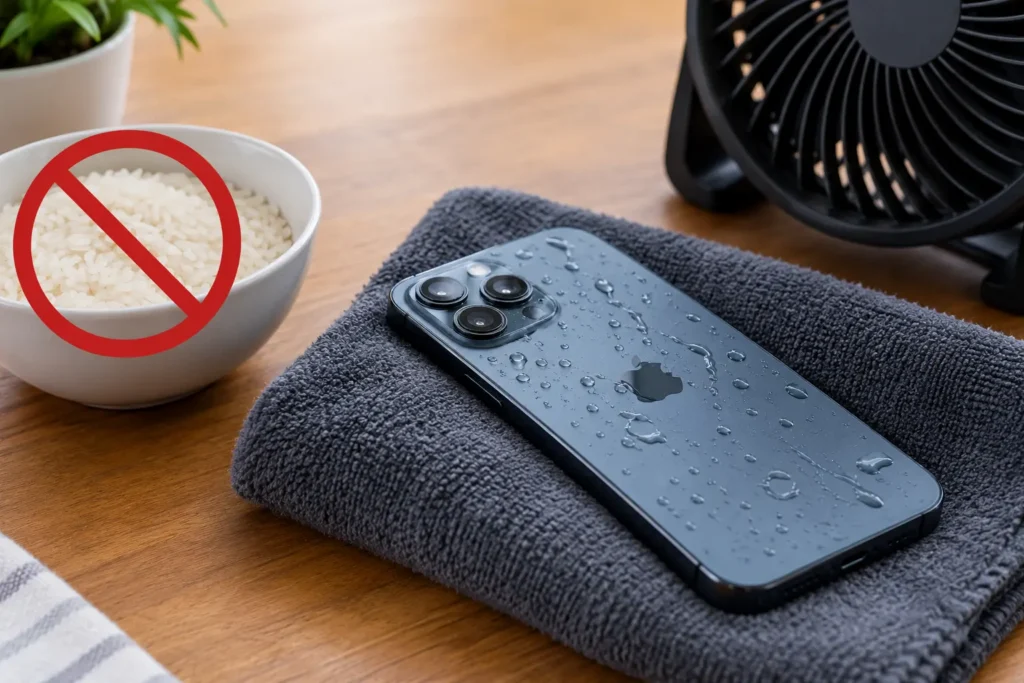
Unplug the iPhone and turn it off. Wipe the outside with a soft cloth and gently tap it against your hand with the charging port facing down. Then leave it in a dry spot with some airflow. Do not charge it right away. Wait at least 30 minutes before you try a cable and expect it to take up to 24 hours to dry fully if the port was soaked. Skip the rice, the hair dryer and the compressed air. They can do more harm than good. The steps below walk you through each stage.
Key Takeaways
- Unplug and power down right away. Water and power do not mix.
- Do not put the phone in rice. Small grains can get into the port and cause damage.
- Never use heat or compressed air to dry a wet iPhone. Let it air dry in a cool, ventilated place.
- Wait at least 30 minutes before charging. Wait longer if the port still looks wet.
- Book a repair if the alert keeps coming back or the phone acts strange.
How to Dry a Wet iPhone Without Rice: Step-by-Step Guide
Follow these six steps in order. Each one removes more moisture without risking the phone.
Step 1: Remove Excess Water With a Soft Cloth
Take the iPhone out of the water as fast as you can. Unplug anything that is connected. Take off the case and wipe the screen, the back, and the sides with a soft lint-free cloth. Pat, do not rub. Dry the buttons and the edges too. If the liquid was salt water or juice, rinse the outside with a little fresh water first and then dry it.
Step 2: Gently Tap the iPhone Against Your Hand
Hold the phone with the charging port facing down. Tap it lightly against your palm a few times. This helps shake out water that sits in the port or around the speaker grills. Do not shake it hard. Do not swing it around. A few gentle taps are enough. Dry the port area with a cloth if you can see water on the outside.
Step 3: Place the iPhone in a Dry, Well-Ventilated Area
Set the phone on a clean towel in a dry room with some airflow. A spot near a fan on low is fine as long as the air is not hot. Keep it away from sunlight and heaters and hair dryers. Heat can damage the battery and the seals. Prop the phone up with the port facing down if you can.
Step 4: Allow Moisture to Evaporate Naturally
This is the hardest part because it takes patience. Water inside the port or under the case needs time to evaporate. Apple says drying can take up to 24 hours if the connector was wet. Do not press buttons or try to turn the phone on to check. Leave it alone. Do not use rice or silica packets as a rush job.
Step 5: Check the Charging Port Before Connecting a Cable
Before you plug in, look at the charging port with a flashlight. It should look dry and clean. Do not stick a cotton swab, a paper towel or a pin into the port. That can push water deeper or damage the pins. Make sure the cable and the power adapter are dry as well. A wet cable can carry moisture right back into the port.
Step 6: Test the iPhone After It Has Dried
After at least 30 minutes, try a cable. If a liquid detection alert appears, unplug and wait longer. Try again after a few more hours. If the phone turns on, check the screen, the speakers, the camera and the buttons. Place a call and play a sound. If everything works, keep an eye on it for a day or two in case problems show up later.
What Should You Do Immediately After Your iPhone Gets Wet?
Act fast but stay calm. These four actions protect the phone in the first minutes.
Disconnect Cables and Accessories
Unplug the charger and any cables, headphones or adapters. Do not plug anything in until the phone is dry. Power flowing through a wet port can cause a short circuit. It can also corrode the pins. If the phone is on a wireless charger, remove it and dry the back before you place it down again.
Turn Off the iPhone if It Is Wet
Power the phone down if it is still on. Hold the side button and a volume button and slide to power off. A phone that is off has less chance of a short circuit. If the screen is unresponsive, hold the buttons until the phone restarts and then power it off. Leave it off while it dries.
Remove the Case and Wipe the Exterior
Take off the case and any screen cover that holds water. Wipe the phone and the case separately. Water can sit between the case and the phone for hours. Wipe around the SIM tray and the buttons with a soft cloth.
Position the Charging Port Facing Down
Hold or rest the phone with the port pointing down. Gravity helps pull water out. Do not lay it flat on the port side. Avoid shaking it. A gentle tilt works better than force. Keep it in this position for a while as you let it dry.
How Long Does an iPhone Take to Dry?
Drying time depends on how wet the phone got. Surface water dries fast. Water in the port takes longer.
Drying Time for Surface Moisture
Water on the screen and body usually dries within an hour or less in a dry room. A quick wipe speeds it up. Moisture in tight spots like the speaker grill may take longer. Give the phone a full hour before you judge it. Do not rush to turn it on just because the outside looks dry.
Waiting Period for a Liquid Detection Alert
If your phone shows a liquid detection alert, unplug it and let it dry. Wait at least 30 minutes before trying again. If the alert comes back, the port is still wet. Keep waiting and try again later. It can take up to a day for the port to dry fully. Avoid trying every few minutes.
When to Try Charging the iPhone Again
Charge only when the port is dry and the alert has cleared. If you must charge in an emergency, you can override the alert. But charging a wet phone is risky. A safer choice is a wireless charger if the back of the phone is dry. Watch for heat or odd behavior and stop charging if you notice any.
When Should You Get Professional Help for a Wet iPhone?
Some problems need a technician. Watch for these four signs.
The Liquid Detection Alert Will Not Clear
If the alert keeps appearing after a full day of drying, the port may hold water or corrosion. It may also be a faulty sensor. A technician can open the port area and clean it. Do not keep trying to charge. Repeated attempts can damage the charging circuit.
The Screen Flickers or Buttons Stop Working
A flickering screen, dead touch areas or sticky buttons often mean moisture inside. Water can short parts of the display or the button flex cables. These issues rarely fix themselves. Turn the phone off and get it checked. Early service can save the screen and the logic board.
The iPhone Will Not Turn On or Charge
If the phone stays dead after drying, do not keep forcing it. Try a different cable and a different charger. If it still will not respond, there may be internal damage. A repair shop can test the battery and the charging port. They may be able to clean the board and revive the phone.
Signs of Internal Water Damage Appear
Look for fog under the camera lens or a muffled speaker. Notice a hot battery or a strange smell. Rust colored marks may show in the port. These signs point to water inside. Corrosion keeps spreading after the phone dries. Professional cleaning can stop it before it gets worse.
Conclusion
Now you know how to dry a wet iPhone without rice. Unplug it, wipe it and tap out the water. Let it air dry in a cool and ventilated spot. Wait before you charge and never use heat or tools in the port. Call a repair shop if the alert stays or the phone acts odd. Quick and gentle care gives your phone the best chance.
If your phone still will not work after drying, bring it to Cell N Tech. We can inspect your iPhone, clean the port and repair water damage.