

iPhone
How to Get Condensation Out of an iPhone Camera
Oct
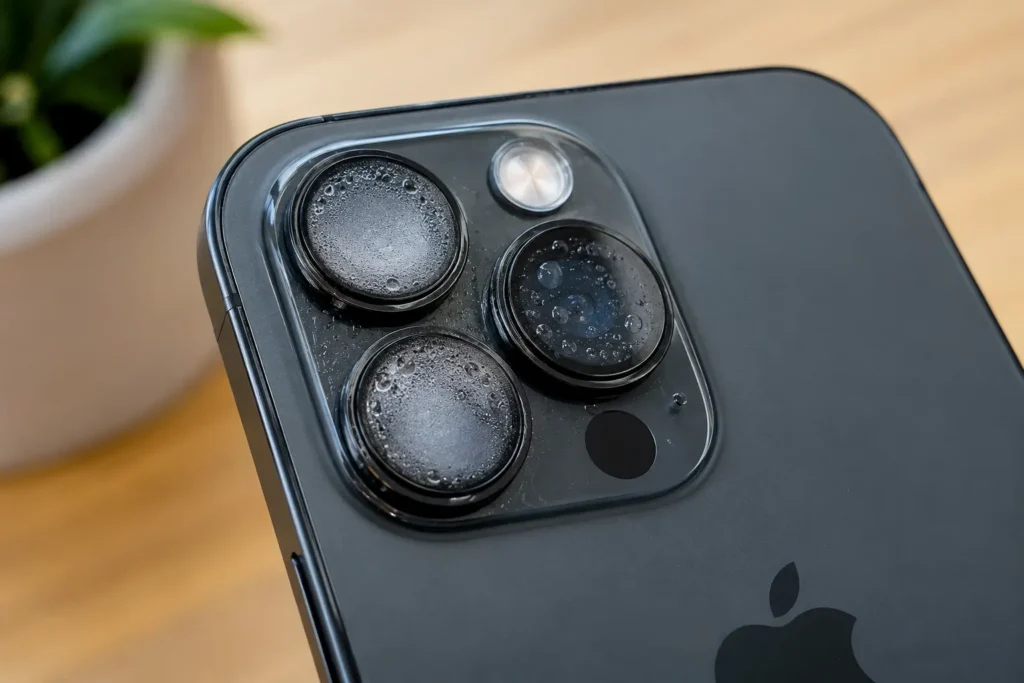
You walk in from the cold, open the camera, and every shot looks like it was taken through a steamy window. A thin fog under the lens is usually condensation, and it often clears on its own. Wipe the outside of the lens first, then let the phone warm up and dry naturally in a ventilated room. If liquid got in, power it off and skip the rice and hair dryer. Patience, airflow, and knowing when to call a technician are what it takes to get condensation out of an iPhone camera.
Key Takeaways
- Fog or droplets under the camera glass, and blurry photos that stay blurry after cleaning, point to moisture inside the camera.
- Wipe the outside lens first. If liquid got inside, turn the iPhone off, unplug it, and let it dry naturally in a cool, airy spot.
- Apple advises against drying iPhones in rice or with external heat. Both can trap residue or damage parts.
- Condensation that lasts more than a day, keeps returning, or comes with focus problems usually means a seal has failed and the camera needs professional attention.
How to Tell if Condensation Is Inside Your iPhone Camera
A smudged lens and a fogged-up camera can look almost the same in a photo. Two quick checks help you figure out which one you’re dealing with.
Fog or Water Droplets Beneath the Camera Glass
Tilt your iPhone under a bright light and look closely at each camera lens. Condensation shows up as a milky haze, a cloudy ring, or tiny beads of water sitting under the glass. The giveaway is that you can’t touch it. Wipe the lens and the fog stays exactly where it was. Sometimes only one lens is affected, so check the wide, ultra wide, and telephoto cameras one by one.
Blurry Photos That Do Not Improve After Cleaning the Lens
Take a test photo of a bright, detailed scene, like text on a sign or a window frame. Moisture inside the camera tends to soften the whole image, wash out colors, and add a glow around lights. If you’ve cleaned the outside lens and the photos still look dreamy, the problem sits behind the glass. Switching between camera lenses in the Camera app can help you spot which one is fogged.
Ways to Clear Condensation From an iPhone Camera
Most condensation clears up with simple, gentle steps. The goal is to let moisture escape without pushing it deeper or adding heat that could harm the phone.
Clean the Outside of the Camera Lens With a Soft Cloth
Start with the easy part. Wipe each camera lens with a clean, dry microfiber cloth to remove fingerprints, skin oil, and surface moisture. Take your phone out of its case too, since water can hide around the camera cutout and fog the glass from the outside. Once the surface is spotless, you’ll know for sure whether the haze is inside.
Turn Off the iPhone and Disconnect Cables if Liquid Has Entered
If the phone got splashed, dropped in water, or spent time in a steamy shower, treat it as a liquid problem. Power it off and unplug any charger or accessory. Apple recommends not charging an iPhone until it’s completely dry, and the phone may even show a liquid-detection alert for the charging port. Gently tap the phone against your hand with the port facing down to release extra water.
Let the iPhone Dry Naturally in a Well-Ventilated Area
Place the iPhone on a dry towel in a room with good airflow and normal temperature. A spot near a fan works well. If the fog came from moving between cold and warm air, it often clears within a few hours as the phone adjusts. For a phone that actually got wet, give it at least a full day before checking the camera again.
Avoid Rice, Hair Dryers, and Direct Heat
The old tricks do more harm than good:
- Rice: Apple specifically advises against it, since small particles can get into the phone
- Hair dryers and heaters: high heat can damage the battery, adhesives, and screen
- Compressed air: it can force water deeper into the phone
- Cotton swabs or paper towels in openings: they can leave fibers behind
Room temperature and fresh air are slower, but much safer.
Why Does Condensation Form Inside an iPhone Camera?
Condensation is basic physics. Warm, humid air holds moisture, and when that air touches a colder surface, the moisture turns back into tiny water droplets. It’s the same thing that happens to a cold soda can on a summer afternoon or a bathroom mirror after a hot shower.
Your iPhone runs into this more often than you’d think. Stepping from a freezing parking lot into a warm house, taking the phone into a steamy bathroom, or leaving it in a humid car can all trigger it. A small amount of air naturally sits inside the camera module, and if it’s humid, fog can form when temperatures change quickly.
Water resistance plays a role too. iPhones are water resistant, not waterproof, and Apple notes that this resistance can decrease over time with normal wear. Drops, cracks, and old repairs can weaken the seals that keep moisture out.
When to Seek Professional iPhone Camera Repair
A one-time fog that clears on its own isn’t usually a big deal. Certain patterns, though, suggest something more serious is going on inside the phone.
Condensation That Persists or Keeps Returning
Fog that’s still there after a full day of drying deserves attention. So does condensation that shows up every time you go outside, take a shower, or charge the phone. Repeat fogging usually means a seal around the camera has failed, letting humid air in again and again. Over time, trapped moisture can leave water spots on the inside of the lens or start corroding nearby parts.
Camera Focus Problems or Visible Internal Damage
Watch for signs that go beyond fog. The camera might struggle to focus, make a faint buzzing or clicking sound, or show a black screen on one lens. Some people notice dark spots, rust-colored marks, or a cracked lens cover. These are signs of possible water damage or a failing camera module, and they won’t fix themselves. A technician can open the phone safely, dry the internal parts, and replace the lens or camera if needed.
How to Prevent Condensation in Your iPhone Camera
You can’t control the weather, but a few everyday habits make fogged cameras much less likely. These are the ones worth building into your routine:
- Let the phone warm up slowly: after time in the cold, keep it in a pocket or bag for a few minutes indoors before using the camera
- Keep it out of steamy rooms: leave your phone outside the bathroom during hot showers and away from boiling pots
- Avoid hot cars: heat and humidity inside a parked car can stress the phone’s seals
- Skip swimming and showers: water resistance is a safety net for accidents, not a feature to test
- Replace cracked camera glass quickly: even a tiny crack gives moisture an easy way in
- Use a case with a raised camera lip: it helps prevent cracks that later let humidity inside
Small habits like these protect the camera and the rest of the phone too.
Conclusion
Most iPhone camera fog comes from quick temperature changes and clears on its own once the phone settles at room temperature. Wipe the outside lens, power the phone down if liquid got in, and let it dry naturally with good airflow. Leave the rice in the pantry and keep heat sources away. If the fog lasts longer than a day or keeps coming back, a seal may have failed.
Still seeing a cloudy lens after waiting it out? Swing by CellNtech and let our iPhone technicians take a closer look. We’ll check for trapped moisture and water damage, explain what we find, and get your camera shooting clear photos again.