

Repair
How to Fix a Scratched Meta Quest 3 Lens
Oct
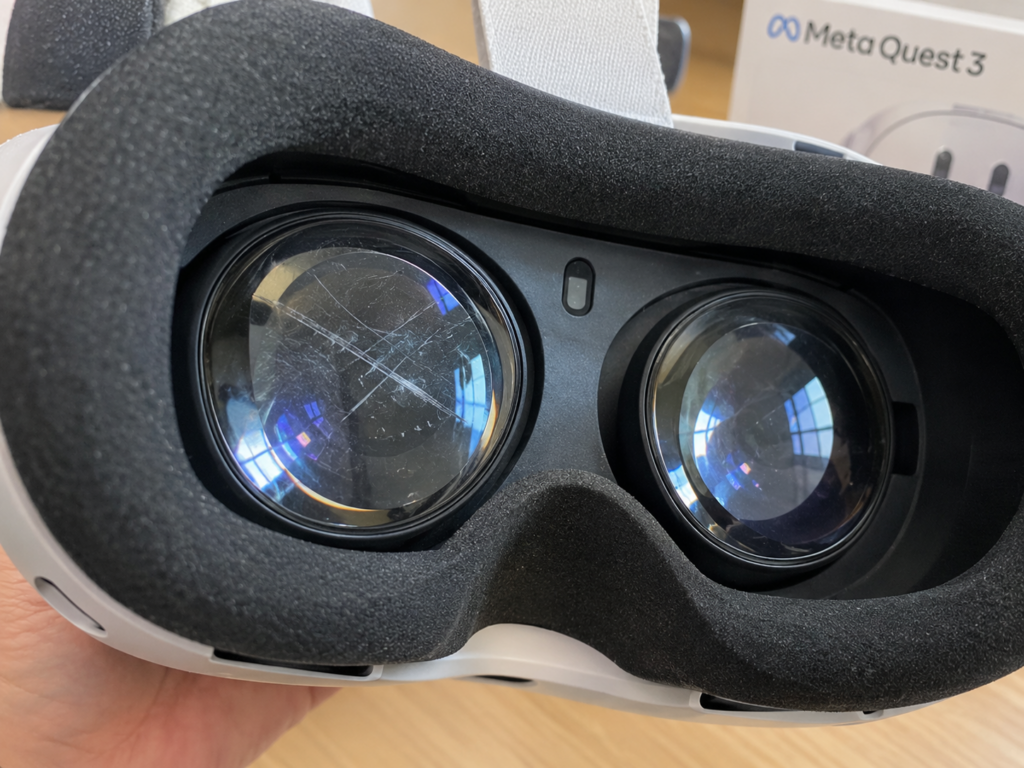
You put the headset on and notice a faint line or hazy patch that wasn’t there last week. Real scratches on Meta Quest 3 lenses can’t be polished out at home, but you can still handle them safely and keep them from getting worse. Start by cleaning the lens with a dry microfiber cloth, skip the DIY hacks, and test whether the mark actually affects your view. If it does, a technician can check your repair options. That’s the honest way to fix a scratched Meta Quest 3 lens.
Key Takeaways
- Deep scratches on Quest 3 lenses can’t be buffed out at home. Light smudges and marks that sit outside your focus may not affect what you see at all.
- Meta says you should clean the lenses only with a dry microfiber cloth. Liquids, toothpaste, and polishes can permanently damage them.
- If a scratch blurs your view, check whether it’s on the lens surface, then look at warranty, support, or professional repair options.
- Prescription inserts, a lens cover, careful storage, and gentle cleaning go a long way toward stopping new scratches.
Can You Fix Scratches on Meta Quest 3 Lenses?
Not in the way most people hope. The Quest 3 uses pancake lenses with delicate optical coatings on the surface. Once a scratch cuts into that coating or the lens itself, no cloth, paste, or polish can smooth it back to its original clarity. Trying usually spreads the damage across a wider area.
The good news is that many marks aren’t as bad as they look. What seems like a scratch is often a smudge, a fingerprint, or a speck of dust. Even real light scratches sometimes vanish once the headset is on, because they sit too close to your eyes to come into focus. A visible line on the outside doesn’t always mean a ruined image inside.
How to Handle a Scratched Meta Quest 3 Lens Safely
How you treat the lens in the first few days matters a lot. A gentle approach keeps a small mark small, while the wrong fix can turn it into a permanent blur.
Clean the Lens With a Dry Microfiber Cloth
Meta’s care guidance says to clean the lenses only with a dry microfiber cloth. Use an optical-grade cloth, like the kind made for eyeglasses or camera lenses. Start at the center and move outward in small, light circles. Don’t press hard, and shake out the cloth first so trapped grit doesn’t drag across the surface. A clean lens often reveals that the “scratch” was only a smear.
Avoid Toothpaste, Abrasive Cleaners, and Unverified Polishing Products
Online hacks for phone screens and glasses don’t belong anywhere near VR lenses. Each of these can do real damage:
- Toothpaste and baking soda: both are abrasive and grind away the lens coating
- Alcohol, window cleaner, or soapy water: Meta warns that liquids can permanently damage the lenses
- Scratch-removal polishes: these are made for other materials and can leave a cloudy patch
- Paper towels and tissues: their fibers are rougher than they feel
Seek Professional Advice for Persistent Scratches
If a mark remains after careful cleaning, stop working on it. Have a repair technician take a look instead. They can tell you whether the scratch is cosmetic, whether it sits on the lens surface, and whether replacing the part is worth the cost compared with living with it.
What to Do if Scratches Affect Your VR Experience
Sometimes a scratch really does get in the way of games, apps, or text that should look sharp. Before you decide on a fix, figure out where the problem actually lives.
Check Whether the Problem Is on the Lens Surface
Blurry or hazy VR isn’t always caused by the lens. Run through these quick checks first:
- Wipe both lenses again and look at them under a bright light at an angle
- Close one eye at a time in VR to see if the issue affects just one side
- Adjust the headset fit, strap, and lens spacing (IPD) to rule out focus problems
- Look for spots that stay fixed in your view no matter where you turn your head
A mark that stays put on one side and lines up with something you can see on the lens, is most likely a real scratch. Dead pixels or display damage look different and usually show up as tiny dots or colored lines.
Explore Support and Repair Options
Start by checking your warranty or any protection plan you bought with the headset. Standard warranties usually cover defects rather than accidental scratches, so read the terms before filing a claim. Meta support can explain official repair or replacement options. A local electronics repair shop that works on VR headsets can also inspect the lenses and walk you through the cost of fixing them versus replacing the headset.
How to Prevent Scratches on Meta Quest 3 Lenses
Since scratches can’t be undone, prevention is your best defense. These three habits cover the most common ways Quest 3 lenses get damaged.
Use Compatible Lens Inserts to Protect Against Eyeglass Contact
Glasses frames are one of the biggest causes of lens scratches. Every time you put the headset on, the edge of your frames can rub against the lenses. Prescription lens inserts made for the Quest 3 clip in front of the lenses, so you can play without glasses at all. If you’d rather keep wearing your glasses, use the headset’s depth adjustment to give them more room.
Store the Headset With a Protective Cover
A soft lens cover keeps dust, keys, and controllers from touching the lenses when the headset isn’t in use. It also blocks sunlight, which matters more than most people realize. Meta warns against leaving the headset in direct sunlight, since the lenses can focus light onto the displays and damage them. A padded case adds protection when you travel.
Clean and Handle the Lenses Carefully
Keep fingers off the lenses when putting the headset on or taking it off. Hold it by the front shell or the strap instead. Wash and dry your microfiber cloth regularly, and store it in a clean pouch so it doesn’t pick up grit. Skip cleaning altogether when the lenses look fine, since every wipe adds a little wear.
Conclusion
A scratched Quest 3 lens can’t be polished back to new, but a calm, careful approach keeps the damage from spreading. Clean only with a dry microfiber cloth, stay away from toothpaste and liquid cleaners, and check whether the mark actually shows up in VR. For the future, prescription inserts, a lens cover, and gentle handling do most of the protective work.
Is that hazy spot still pulling you out of the game? Drop your headset off at CellNtech. Our technicians handle Meta Quest 3 repairs, will look closely at the lenses and display, and give you an honest read on whether a repair makes sense.