

Laptop
How to Tell If a Swollen Battery Is Lifting Your Laptop Trackpad
Oct
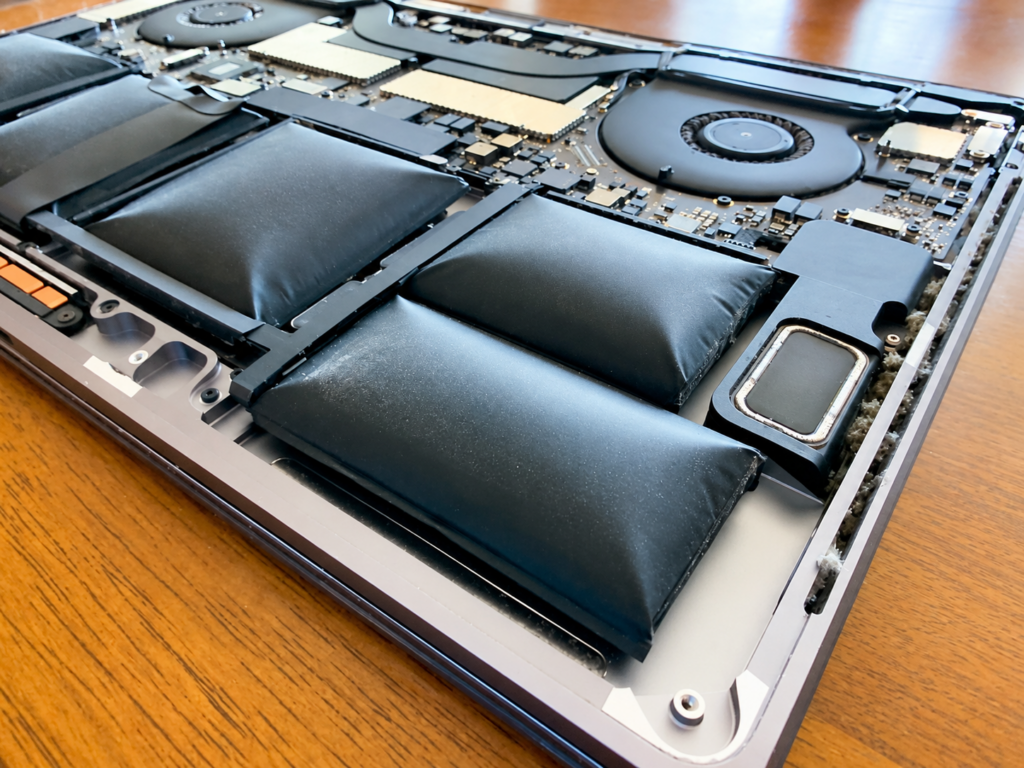
Your trackpad suddenly feels stiff, the click is gone, and one corner sits slightly higher than before. That’s often the first clue of a swollen battery. In many laptops, the battery sits right under the trackpad, so as it puffs up, it pushes the pad upward. Watch for a raised or tilted trackpad, gaps in the case, a laptop that rocks on a flat table, or a warped keyboard. Spotting a swollen battery lifting your laptop trackpad early keeps you safer and limits the damage.
Key Takeaways
- A raised or uneven trackpad, lost click, case gaps, or a bulging bottom panel are the classic signs. Together, several of them almost always point to the battery.
- Lithium-ion batteries swell when gas builds up inside, usually from age, heat, constant charging, or physical damage.
- If you suspect swelling, shut the laptop down, unplug it, and stop using it. Don’t press on the trackpad or try to pull the battery out yourself.
- A swollen battery can crack the trackpad, bend the case, and damage nearby parts. Getting it replaced quickly protects both you and the laptop.
Signs a Swollen Battery Is Lifting Your Laptop Trackpad
Battery swelling tends to show itself in the parts of the laptop sitting closest to the battery. These three signs are the ones to look for first.
A Raised or Uneven Trackpad
Look at the trackpad from the side at eye level. It should sit flush with the palm rest all the way around. If one edge or corner stands higher than the rest, or the whole pad looks tilted, something underneath is pushing it up. Run a fingertip along the border, too. A lip you can feel where there used to be none is a strong warning sign.
Trackpad Clicking Problems and Case Gaps
A swollen battery presses on the trackpad from below, which often stops it from clicking. You might notice the click feels mushy, works only in one corner, or doesn’t register at all. Some laptops start registering phantom clicks instead. Check the seams of the case as well. New gaps between the top cover and the bottom panel, or a panel that no longer sits tight, usually mean pressure is building inside.
A Bulging Laptop Bottom or Warped Keyboard
Set the laptop on a flat table and press gently on each corner. If it rocks or spins easily, the bottom may be bulging outward. Also look across the keyboard. Keys that sit higher than their neighbors, stick, or feel uneven can point to the battery pushing up from beneath.
How to Distinguish Battery Swelling From Other Trackpad Problems
Not every trackpad problem comes from the battery. Other causes look similar but leave different clues behind:
- Debris under the pad: crumbs or dust can block the click, though the trackpad still sits flat
- Software or driver issues: the cursor jumps or gestures stop working, yet the pad looks and feels normal
- Drop damage: a dent, crack, or bent corner usually points to an impact rather than swelling
- Loose screws or brackets: the pad may rattle but won’t be pushed upward
The key difference is pressure from below. Swelling raises the trackpad and often affects the case and keyboard too. On a Mac, a “Service Recommended” battery message adds another clue. Windows users can run a battery report to check how much capacity has dropped.
What Causes a Laptop Battery to Swell?
Most laptops run on lithium-ion or lithium-polymer batteries. As these cells age, chemical reactions inside can produce gas. In a soft pouch cell, that gas has nowhere to go, so the battery slowly puffs up.
A few things speed the process along. Heat is a big one, especially from gaming, heavy workloads, or using the laptop on a bed or couch that blocks the vents. Keeping the laptop plugged in at 100% for months on end adds stress too. Cheap replacement chargers, older batteries with many charge cycles, physical damage from drops, and the occasional manufacturing defect round out the list.
What to Do if Your Laptop Battery Is Swollen
A swollen battery is a safety issue, not just a cosmetic one. Damaged lithium cells can overheat and, in rare cases, catch fire. These steps keep the risk low.
Stop Using and Charging the Laptop
If the laptop still runs normally, back up anything important, then shut it down completely. Unplug the charger and don’t plug it back in. Set the laptop on a hard, non-flammable surface away from bedding, paper, and anything else that could burn. Keep it somewhere cool and out of direct sunlight.
Avoid Pressing the Trackpad or Removing the Battery Yourself
Pressing on a raised trackpad squeezes the battery underneath, which can damage the cell further. Opening the case to pull the battery out is riskier still. Many laptop batteries are glued in place, and prying them loose with tools can puncture a cell. A punctured lithium battery can release smoke or catch fire within seconds.
Arrange Professional Battery Inspection
A trained technician can open the laptop safely, confirm the battery is the problem, and check whether the trackpad, keyboard, or case took any damage. They can also replace the battery with a compatible one and make sure the old one is recycled properly. Swollen batteries should never go in household trash.
Can a Swollen Battery Damage Your Laptop Trackpad?
Yes, and the damage often grows the longer the battery stays in place. Constant pressure from below can bend the trackpad’s mounting bracket, crack its glass surface, or break the click mechanism for good. In some laptops, the cable connecting the trackpad to the logic board gets stressed as well.
The good news is that catching it early usually limits the repair. Once the swollen battery comes out, many trackpads settle back into place and work normally again. If the pad or bracket was bent too far, it may need replacing along with the battery.
Conclusion
A trackpad that rises, stops clicking, or sits crooked is one of the clearest signs of a swollen battery, especially when the case gaps open up or the laptop rocks on a flat surface. Once you notice these changes, power the laptop down, stop charging it, and leave the trackpad and battery alone. Quick action keeps you safe and gives the trackpad its best chance of recovering.
CellNtech technicians repair laptops and MacBooks every day. Walk in without an appointment, and our team will safely remove the swollen battery, fit a reliable replacement, check the trackpad for damage, and send the old cell off for proper recycling.